MacroToolkit-PowerPoint
What is it?
Since PowerPoint often requires manual work tailored to each specific scenario, it’s harder to create standardized features compared to Excel. For that reason, I’ve gathered useful code snippets I found through extensive web surfing. Feel free to review and modify them to fit your needs.
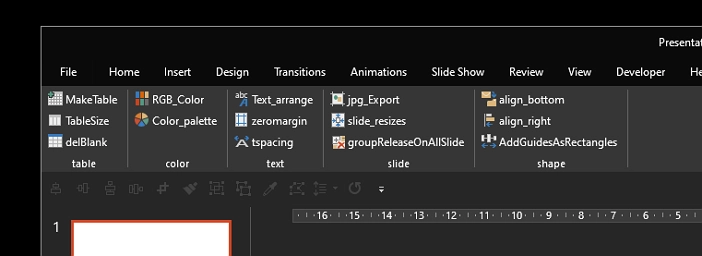
Key Point
Instead of relying on UserForm, I made active use of the Ribbon menu to enhance usability.
Functions
| name | Description |
|---|---|
| Make Table | Creates frequently used table templates |
| Table Size | Adjusts table size via UserForm |
| delblank | Removes blanks created when copying tables in Excel; note it removes all spaces in the table |
| RGB Color | Displays RGB values of the selected shape via UserForm |
| Color palette | Creates a color palette in the slide master - newly added feature |
| Text arrange | Adjusts letter spacing of Malgun Gothic font to 0.3 |
| zeromargin | Sets margins of text boxes or shapes to zero |
| tspacing | Adjusts line spacing |
| jpg export | Exports selected slides as JPG files |
| slide_resizes | Changes slide size based on pixel dimensions |
| groupRelease | Ungroups all groups on all slides at once |
| align_bottom | Aligns selected shape(s) to the bottom of the first selected shape |
| align_right | Aligns selected shape(s) to the right of the first selected shape |
| guidebox | Creates guide boxes (rectangles) spaced at regular intervals |
Download
To manage versions, the files are stored at the following location:
github - download
original post (Kor)