xls - 용량 비정상적으로 커졌을 때 줄이기
inspiration
엑셀용량이 비정상적으로 커진 파일들을 의외로 자주 보게된다. 몇가지 이유가 있겠지만 일반화 시키기는 어렵다.
일반적인 상황에서는 아래 글에서 도움을 받을 수 있다.
불행히도 위의 경우가 모든 것이 아닌데, 용량이 늘어나서 로딩 속도가 길어지는 것도 문제지만, 관리상 짜증나는 경우는 다음과 같다.
✶ cell style이 몇 백개 되는 경우
✶ 이름관리자에서 선언된 이름이 몇 백개 되는 경우
✶ 원치 않는 사용영역(UsedRange)이 설정된 경우
execution-1
이 중 ‘원치 않는 사용영역(usedRange)이 설정된 경우’는 그 무엇보다 짜증나는 상황이고 용량도 어마무시하게 늘어난다.
대부분 엑셀을 잘하는 친구들이 ctrl/shift 와 방향키로 손이 안보이게 움직이다가 맨 마지막셀 어딘가에 스페이스바나 글자 하나를 입력한 경우라 할 수 있다.
서너개의 시트로 구성된 워크북이라면, 일일이 ctrl + end 키로 usedrange 를 체크하면 되겠지만, 수십개의 시트가 있다면 그 또한 쉬운 일이 아니다.
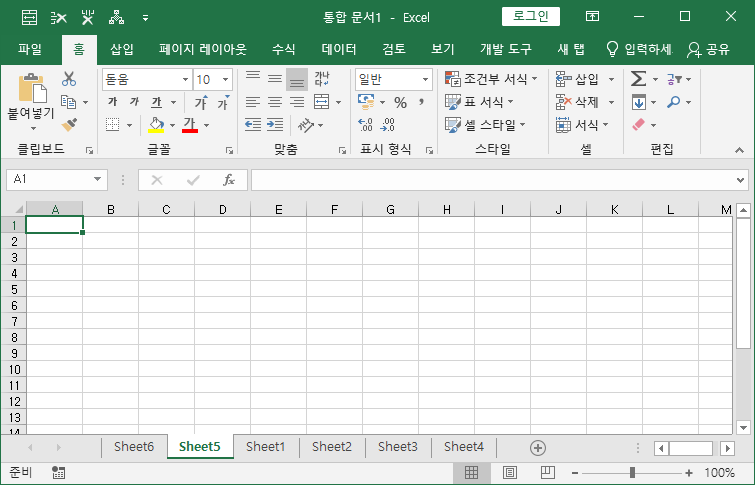
과거 USEDRANGE의 마지막 셀주소를 찾는 글을 쓴 적이 있는데, 아주 약간만 변형해서, 사용해 본다.
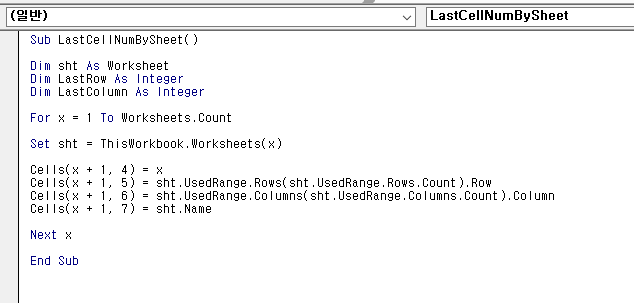
sample.bas
Sub LastCellNumBySheet()

Dim sht As Worksheet
Dim LastRow As Integer
Dim LastColumn As Integer

For x = 1 To Worksheets.Count

Set sht = ThisWorkbook.Worksheets(x)

Cells(x + 1, 4) = x
Cells(x + 1, 5) = sht.UsedRange.Rows(sht.UsedRange.Rows.Count).Row
Cells(x + 1, 6) = sht.UsedRange.Columns(sht.UsedRange.Columns.Count).Column
Cells(x + 1, 7) = sht.Name

Next x

End Sub
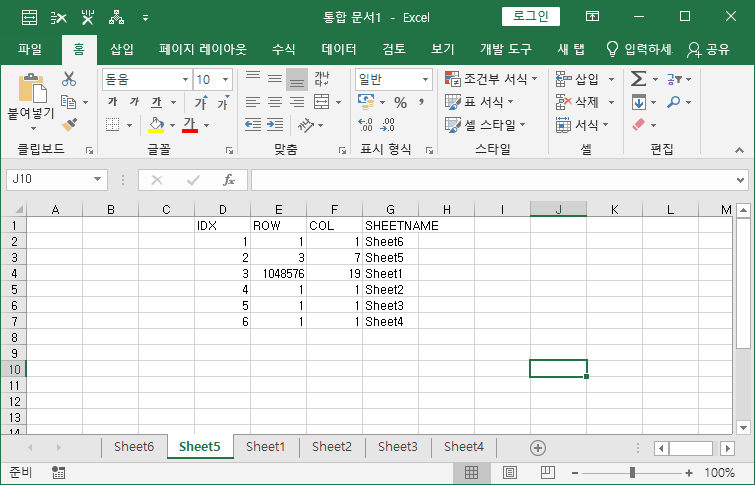
위 코드를 실행하면 왼쪽부터 SHEET INDEX, 마지막 셀의 ROW(행), COLUMN(열), SHEETNAME 순서로 나온다.
귀찮아서, HEAD는 안붙였다.
아래 예시에서 보면, Sheet1번의 마지막 행이 이상하다는 걸 알수 있다.
execution-2
하지만, 위의 방법이 먹히지 않는 경우가 있는데, 도무지 이유도 알 수 없고, 심지어 모든 값을 다 지워도, 용량이 줄지 않는 때가 있더란 말이다.
그래도, 끝없이 구글링을 한 결과, 먹히는 VBA를 찾아냈으니, 모든 케이스가 먹히지 않는다면, 시도해 보길 바란다. 링크가 깨져서 직접 코드를 올린다. 단, 그 어떤 검증도 되지 않았으니, 심각한 위기 상황에만 사용을 고려해보길 바란다. 🤪
sample.bas
Option Explicit

Sub dietFileSize()

    Dim j               As Long
    Dim k               As Long
    Dim LastRow         As Long
    Dim LastCol         As Long
    Dim ColFormula      As Range
    Dim RowFormula      As Range
    Dim ColValue        As Range
    Dim RowValue        As Range
    Dim Shp             As Shape
    Dim ws              As Worksheet

    Application.ScreenUpdating = False
    Application.DisplayAlerts = False

    On Error Resume Next

    If MsgBox("Backup your File before run this macro!!" & vbCrLf & "Do you wanna run?", vbYesNo) Then

        For Each ws In Worksheets
            With ws
                'Find the last used cell with a formula and value
                'Search by Columns and Rows
                On Error Resume Next
                Set ColFormula = .Cells.Find(What:="*", After:=Range("A1"), LookIn:=xlFormulas, _
                LookAt:=xlPart, SearchOrder:=xlByColumns, SearchDirection:=xlPrevious)
                Set ColValue = .Cells.Find(What:="*", After:=Range("A1"), LookIn:=xlValues, _
                LookAt:=xlPart, SearchOrder:=xlByColumns, SearchDirection:=xlPrevious)
                Set RowFormula = .Cells.Find(What:="*", After:=Range("A1"), LookIn:=xlFormulas, _
                LookAt:=xlPart, SearchOrder:=xlByRows, SearchDirection:=xlPrevious)
                Set RowValue = .Cells.Find(What:="*", After:=Range("A1"), LookIn:=xlValues, _
                LookAt:=xlPart, SearchOrder:=xlByRows, SearchDirection:=xlPrevious)
                On Error GoTo 0

                'Determine the last column
                If ColFormula Is Nothing Then
                    LastCol = 0
                Else
                    LastCol = ColFormula.Column
                End If
                If Not ColValue Is Nothing Then
                    LastCol = Application.WorksheetFunction.Max(LastCol, ColValue.Column)
                End If

                'Determine the last row
                If RowFormula Is Nothing Then
                    LastRow = 0
                Else
                    LastRow = RowFormula.row
                End If
                If Not RowValue Is Nothing Then
                    LastRow = Application.WorksheetFunction.Max(LastRow, RowValue.row)
                End If

                'Determine if any shapes are beyond the last row and last column
                For Each Shp In .Shapes
                    j = 0
                    k = 0
                    On Error Resume Next
                    j = Shp.TopLeftCell.row
                    k = Shp.TopLeftCell.Column
                    On Error GoTo 0
                    If j > 0 And k > 0 Then
                        Do Until .Cells(j, k).Top > Shp.Top + Shp.Height
                            j = j + 1
                        Loop
                        If j > LastRow Then
                            LastRow = j
                        End If
                        Do Until .Cells(j, k).Left > Shp.Left + Shp.Width
                            k = k + 1
                        Loop
                        If k > LastCol Then
                            LastCol = k
                        End If
                    End If
                Next

                .Range(.Cells(1, LastCol + 1), .Cells(.Rows.Count, .Columns.Count)).EntireColumn.Delete
                .Range("A" & LastRow + 1 & ":A" & .Rows.Count).EntireRow.Delete
            End With
        Next

    End If

    Application.ScreenUpdating = True
    Application.DisplayAlerts = True

End Sub
되긴 되더라.
끝.