xls - 특정문자 기준으로 텍스트 추출하기
inspiration
텍스트를 정렬하고 짜르고 붙이는 건 노가다가 빠른지 코드를 짜놓는게 좋은지 판단이 서지 않을 때가 많다.
문득, 셀 안의 텍스트 중 한 단어를 고르면, 그 단어 뒤만 남게 되는 코드를 짜보고 싶었다.
execution-1
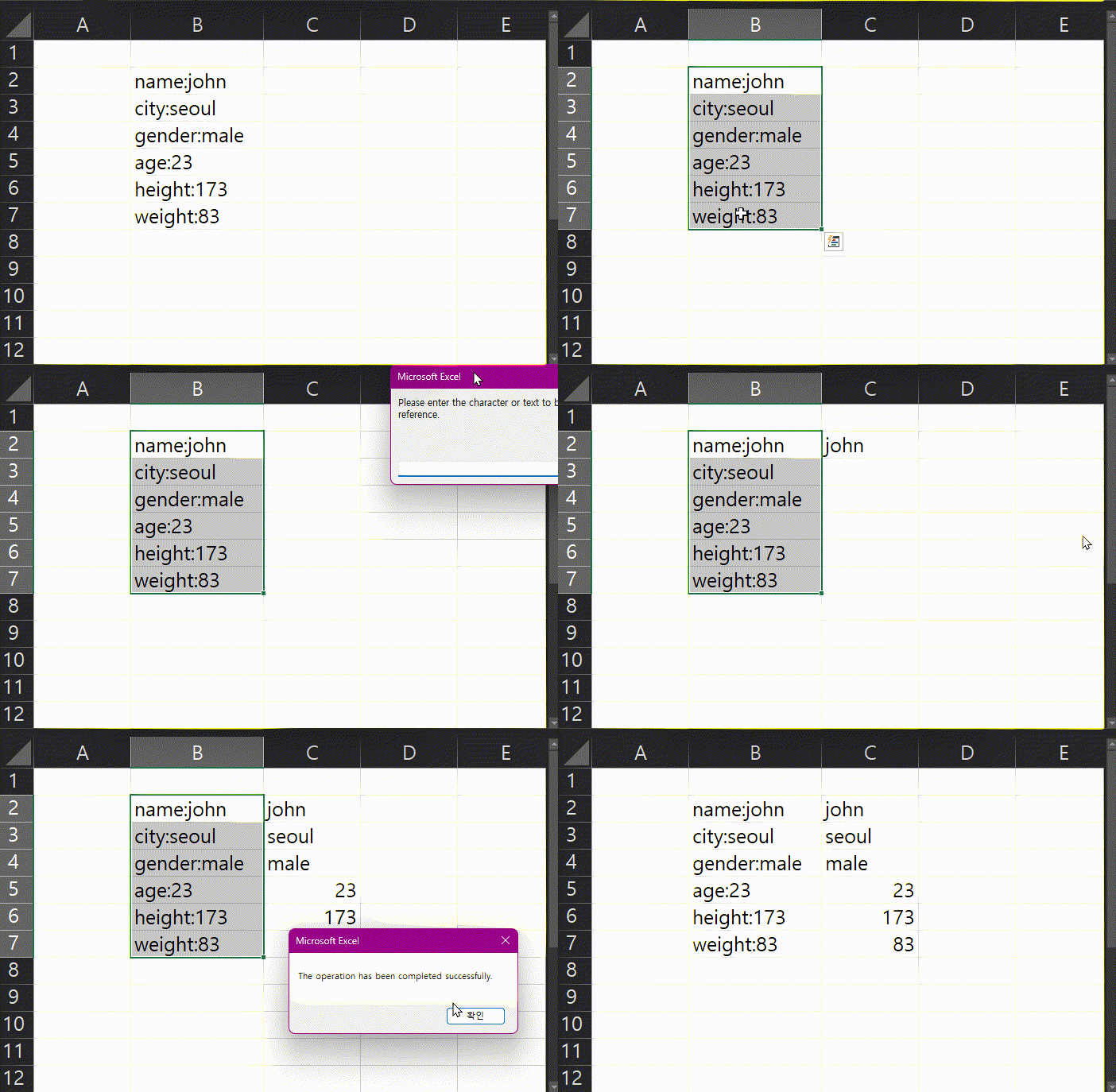
- 텍스트 영역을 선택 하고,
- 매크로 실행, 원하는 문자를 입력
- 해당 영역의 우측셀에 해당 문자 이후 자동 복사
Sub kk()

    Dim targetRange As Range
    Dim c As Range
    Dim myWord As String
    Dim pos As Long
    Dim cellText As String

    ' Verify whether a valid cell range is selected
    If TypeName(Selection) <> "Range" Then
        MsgBox "Please select a valid cell range before proceeding."
        Exit Sub
    End If

    Set targetRange = Selection

    ' Request input text from the user
    myWord = InputBox("Please enter the character or text to be used as a reference.")

    ' Check for empty input
    If myWord = "" Then
        MsgBox "No input was provided. The process has been terminated."
        Exit Sub
    End If

    ' Process each selected cell
    For Each c In targetRange

        cellText = CStr(c.Value)

        ' Determine whether the input text exists in the cell
        pos = InStr(1, cellText, myWord)

        If pos = 0 Then
            MsgBox "The specified text does not exist in the selected cell." & vbCrLf & _
                   "Cell address: " & c.Address
            Exit Sub
        End If

        ' Return the text following the first occurrence to the right-hand cell
        c.Offset(0, 1).Value = Mid(cellText, pos + Len(myWord))

    Next c

    MsgBox "The operation has been completed successfully."

End Sub
execution-2
뭔가 부족하지 않은가? 몇가지 옵션을 준다.
aaa-bbb-ccc 처럼 어떤 기호 또는 문자로 텍스트가 구분이 될 때, 원하는 영역의 값을 함수로 귀찮게 작성하지 말고, 추출을 하고 싶다.
- 기준이 되는 문자을 입력
- 입력한 문자가 여러번 들어가 있을때, 첫번째를 할지 마지막을 할지, 지정한 n번째를 기준으로 할지 선택
- 입력한 문자를 기준으로 앞을 가져올지 뒤를 가져올지, 또는 n-m 까지의 사이값을 가져올지 선택
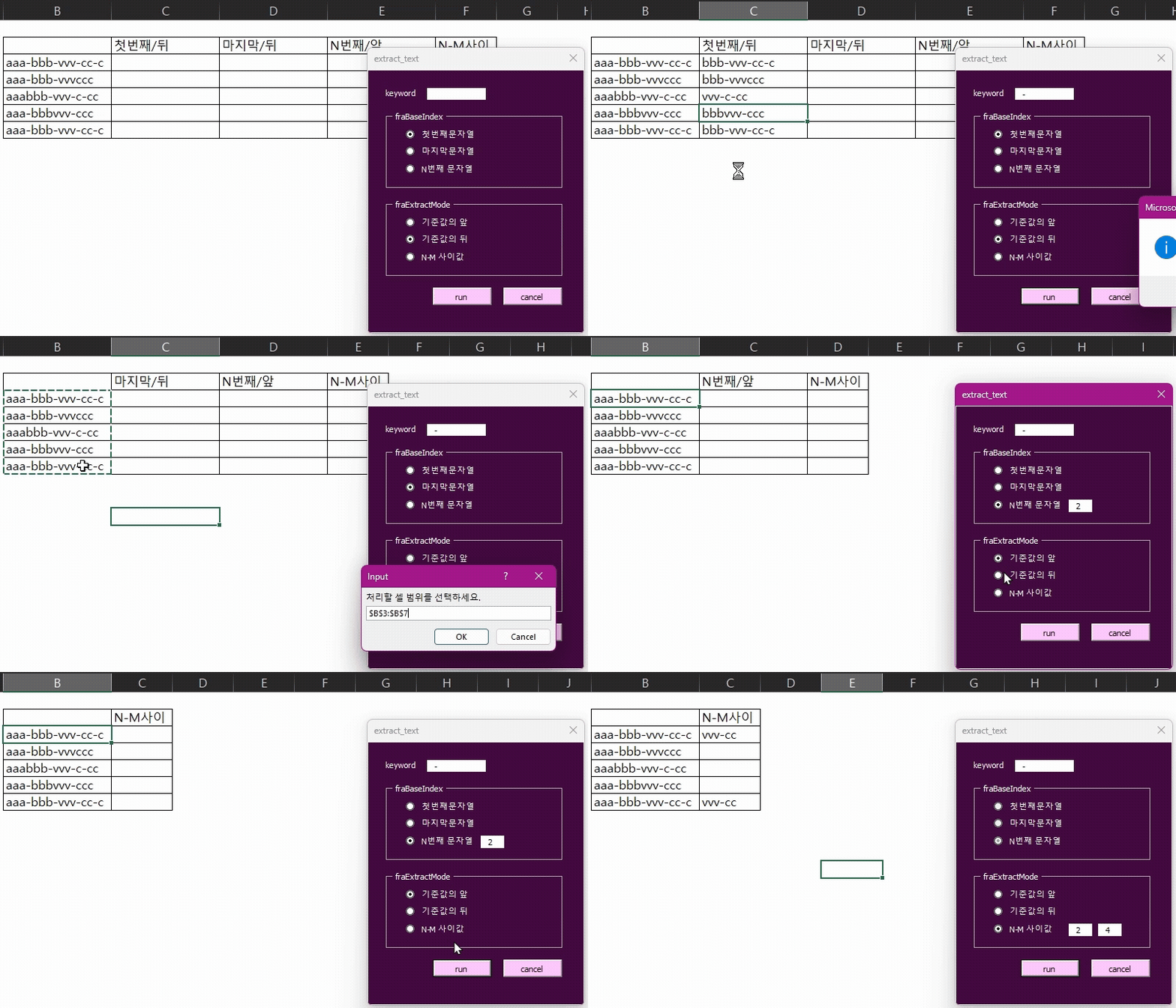
사용된 코드는 다음과 같다.
module.bas
Sub Run_Text_Extractor()
    frmExtract.Show
End Sub

Function ExtractText(cellText As String, keyword As String, _
                     baseIndex As Long, mode As String, _
                     n As Long, m As Long) As String

    Dim positions() As Long
    Dim pos As Long, count As Long
    Dim targetPos As Long

    pos = 1
    Do
        pos = InStr(pos, cellText, keyword)
        If pos = 0 Then Exit Do
        count = count + 1
        ReDim Preserve positions(1 To count)
        positions(count) = pos
        pos = pos + Len(keyword)
    Loop

    If count = 0 Then Exit Function

    ' 기준 위치 결정
    If baseIndex = 1 Then
        targetPos = positions(1)
    ElseIf baseIndex = -1 Then
        targetPos = positions(count)
    ElseIf baseIndex > 0 And baseIndex <= count Then
        targetPos = positions(baseIndex)
    Else
        targetPos = positions(1)
    End If

    ' 추출 방식
    Select Case mode
        Case "BEFORE"
            ExtractText = Left(cellText, targetPos - 1)

        Case "AFTER"
            ExtractText = Mid(cellText, targetPos + Len(keyword))

        Case "BETWEEN"
            If n < 1 Or m > count Or n >= m Then Exit Function
            ExtractText = Mid(cellText, _
                              positions(n) + Len(keyword), _
                              positions(m) - (positions(n) + Len(keyword)))
    End Select
End Function
text_extract.frm
Option Explicit

' =========================
' UserForm 초기화
' =========================
Private Sub UserForm_Initialize()

    ' 기본값
    optFirst.value = True
    optAfter.value = True

    ' 입력창 기본 숨김
    txtNth.Visible = False
    txtN.Visible = False
    txtM.Visible = False

End Sub

' =========================
' 실행 버튼
' =========================
Private Sub btnRun_Click()

    Dim targetRange As Range
    Dim c As Range
    Dim keyword As String
    Dim result As String

    ' 처리할 범위 선택
    On Error Resume Next
    Set targetRange = Application.InputBox( _
                        Prompt:="처리할 셀 범위를 선택하세요.", _
                        Type:=8)
    On Error GoTo 0

    If targetRange Is Nothing Then
        MsgBox "처리할 영역이 선택되지 않았습니다.", vbExclamation
        Exit Sub
    End If

    ' 기준값 확인
    keyword = Trim(txtKeyword.value)
    If keyword = "" Then
        MsgBox "기준값을 입력하세요.", vbExclamation
        Exit Sub
    End If

    ' 기본값 자동 보정
    If Not (optFirst.value Or optLast.value Or optNth.value) Then
        optFirst.value = True
    End If

    If Not (optBefore.value Or optAfter.value Or optBetween.value) Then
        optAfter.value = True
    End If

    ' 셀 처리
    For Each c In targetRange
        result = ExtractText( _
                    CStr(c.value), _
                    keyword, _
                    GetBaseIndex(), _
                    GetExtractMode(), _
                    Val(txtN.value), _
                    Val(txtM.value))
        c.Offset(0, 1).value = result
    Next c

    MsgBox "작업이 완료되었습니다.", vbInformation

End Sub

' =========================
' 닫기 버튼
' =========================
Private Sub btnClose_Click()
    Unload Me
End Sub

' =========================
' 첫 번째 옵션 : n번째 선택
' =========================
Private Sub optNth_Click()
    txtNth.Visible = True
    txtNth.SetFocus
End Sub

Private Sub optFirst_Click()
    txtNth.Visible = False
End Sub

Private Sub optLast_Click()
    txtNth.Visible = False
End Sub

' =========================
' 두 번째 옵션 : BETWEEN 선택
' =========================
Private Sub optBetween_Click()

    ' N-M 입력창 표시
    txtN.Visible = True
    txtM.Visible = True
    txtN.SetFocus

    ' 첫 번째 옵션 비활성화
    optFirst.Enabled = False
    optLast.Enabled = False
    optNth.Enabled = False
    txtNth.Visible = False

End Sub

Private Sub optBefore_Click()
    RestoreBaseOptions
End Sub

Private Sub optAfter_Click()
    RestoreBaseOptions
End Sub

' =========================
' 첫 번째 옵션 복구
' =========================
Private Sub RestoreBaseOptions()

    txtN.Visible = False
    txtM.Visible = False

    optFirst.Enabled = True
    optLast.Enabled = True
    optNth.Enabled = True

    If Not (optFirst.value Or optLast.value Or optNth.value) Then
        optFirst.value = True
    End If

End Sub

' =========================
' 기준 위치 값 반환
' =========================
Private Function GetBaseIndex() As Long

    If optFirst.value Then
        GetBaseIndex = 1

    ElseIf optLast.value Then
        GetBaseIndex = -1

    ElseIf optNth.value Then
        If Val(txtNth.value) < 1 Then
            GetBaseIndex = 1
        Else
            GetBaseIndex = Val(txtNth.value)
        End If
    End If

End Function

' =========================
' 추출 방식 반환
' =========================
Private Function GetExtractMode() As String

    If optBefore.value Then
        GetExtractMode = "BEFORE"

    ElseIf optAfter.value Then
        GetExtractMode = "AFTER"

    ElseIf optBetween.value Then
        GetExtractMode = "BETWEEN"
    End If

End Function

' =========================
' 문자열 추출 핵심 함수
' =========================
Private Function ExtractText( _
        cellText As String, _
        keyword As String, _
        baseIndex As Long, _
        mode As String, _
        n As Long, _
        m As Long) As String

    Dim positions() As Long
    Dim pos As Long
    Dim count As Long
    Dim targetPos As Long

    ' 기준값 위치 수집
    pos = 1
    Do
        pos = InStr(pos, cellText, keyword)
        If pos = 0 Then Exit Do

        count = count + 1
        ReDim Preserve positions(1 To count)
        positions(count) = pos

        pos = pos + Len(keyword)
    Loop

    If count = 0 Then Exit Function

    ' 기준 위치 결정
    Select Case baseIndex
        Case 1
            targetPos = positions(1)
        Case -1
            targetPos = positions(count)
        Case Else
            If baseIndex < 1 Or baseIndex > count Then
                targetPos = positions(1)
            Else
                targetPos = positions(baseIndex)
            End If
    End Select

    ' 추출 방식
    Select Case mode

        Case "BEFORE"
            If targetPos > 1 Then
                ExtractText = Left(cellText, targetPos - 1)
            End If

        Case "AFTER"
            ExtractText = Mid(cellText, targetPos + Len(keyword))

        Case "BETWEEN"
            If n < 1 Or m > count Or n >= m Then Exit Function

            ExtractText = Mid( _
                cellText, _
                positions(n) + Len(keyword), _
                positions(m) - (positions(n) + Len(keyword)))
    End Select

End Function
한 단계라도 절차를 간소화 하기 위해 결과값을 무조건 선택한 영역의 우측열에 반환되도록 했는데, 원하는 영역에 뿌리고 싶다면, 그건 코드를 수정하면 되겠지?
끝.