MacroToolkit - excel, powerpoint
What is it?
회사생활을 하면서 수집하거나 직접 만든 매크로들 중에 가장 빈번히 사용하거나 유용한 기능을 모아두었다.
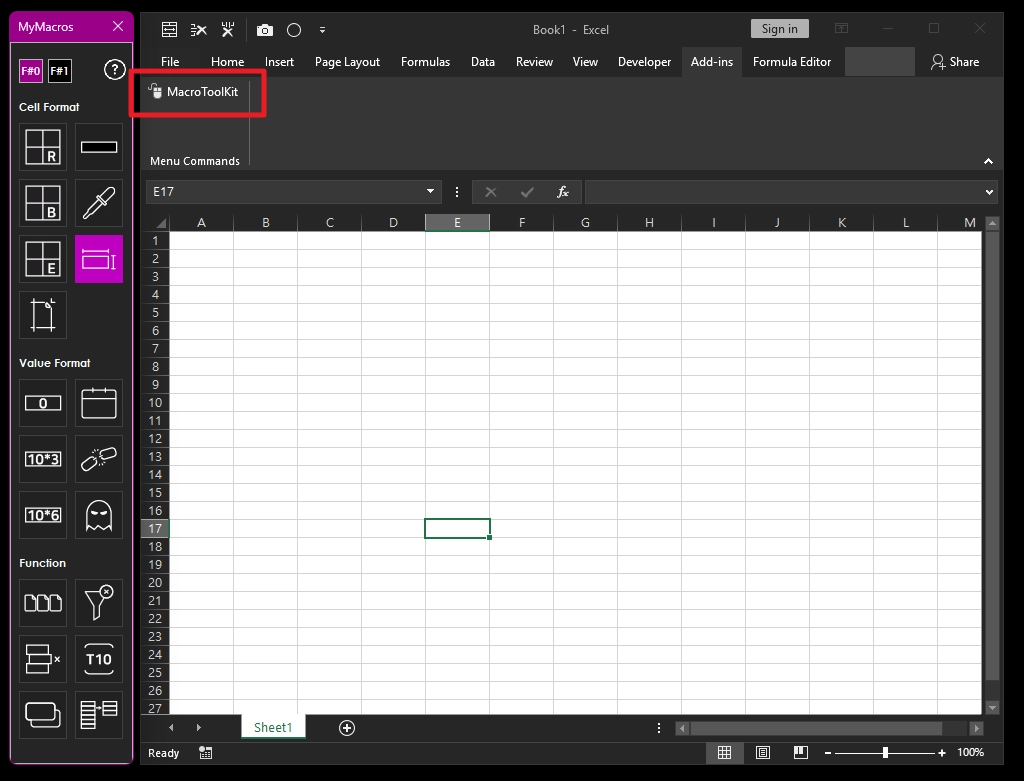
엑셀
excel add-in userform (.xla)
파워포인트
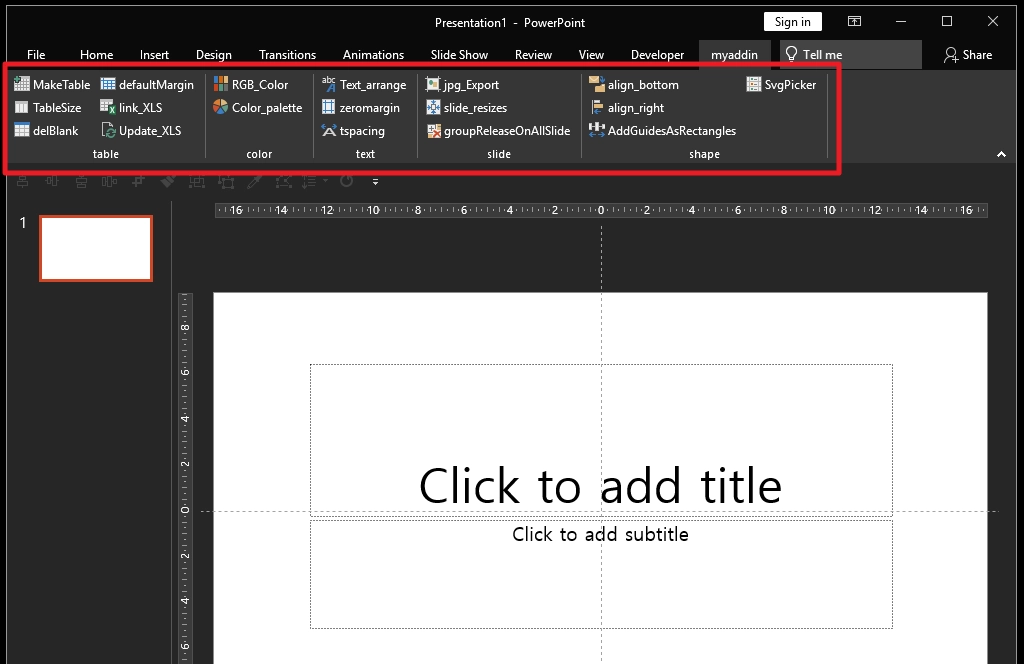
powerpoint add-in (.ppam)
Things to Know
몇가지 미리 알아야할 사항은 다음과 같다.
✶ 엑셀은 VBA 사용 이후 UNDO(ctrl + z)가 적용되지 않는다. 따라서, 기능이 익숙해지지 않았다면 사용전에 엑셀 파일을 다른이름으로 저장하고 사용하는 것을 추천한다.
✶ 모든 상황에 대한 예외 처리가 되어있지는 않기 때문에, 정해진 조건 내에서 사용하지 않을 경우, 에러가 날 수 있다.
✶ 매크로 기본 언어 및 설명이 영어로 되어있는데, 발로적은 영어라 정확하지 않을 수 있다.
✶ PC에 해가 될 수 있는 그 어떤 코드도 포함되어있지 않다.
✶ VBA 코드에는 암호가 걸려있다. 큰 의미는 없다.
✶ 개인적으로 필요한 기능을 모아두었을 뿐, 상황에 따라 추가로 필요한 기능이 있다면 ‘chaGPT’와 함께 직접 만들어 보는 것을 추천한다.
File download & tutorial
아래 깃 허브 경로에서 다운 받을 수 있으며, VBA 사용법을 모른다면 사용법 포스트에서 확인할 수 있다.
excel - Scripts & Tutorial
스크립트들과 사용방법 영상을 올려본다. 생각보다 자주 변경을 하는터라, 최신 버전과 모양이나 내용이 다소 다를 수 있다.
Cell format Script
cell outline (1) : lineGray
Remove the guidelines and create the gray line.
→ click : outskirt of the cell range selected.
→ double click : entire cell of the cell range selected.
→ keyboard shortcut : ALT + SHIFT + 1
cell outline (2) : lineBlack
Remove the guidelines and create the black line.
→ click : outskirt of the cell range selected.
→ double click : entire cell of the cell range selected.
→ keyboard shortcut : ALT + SHIFT + 2
cell outline (3) : lineBlackBold
Remove the guidelines and create the bold black line.
→ click : outskirt of the cell range selected.
→ double click : entire cell of the cell range selected.
→ keyboard shortcut : ALT + SHIFT + 3
colorFill
fill gray color on the cell selected.
→ keyboard shortcut : ALT + SHIFT + 4
setA4
Adjust the page size for A4 size.
→ recommended for new worksheet.
colorpicker
Copy the color of the selected cell and paste it to the cell that is selected.
copyWidthHeight
Copy the width & height of the selected cell and paste it to the cell that is selected.
Value format Script
Number format (1) - formatNum_normal
Change to a normal number format.
[yes - with right padding(accounting)] #,##0_-;[Red]-#,##0_-;-_-
[no - without right padding] #,##0;[Red]-#,##0;-
Number format (2) - formatNum_thousand
Change in a thousand unit number format.
[yes - with right padding(accounting)] #,##0,-;[Red]-#,##0,-;-_-
[no - without right padding] #,##0,;[Red]-#,##0,;-
Number format (3) - formatNum_mil
Change in a million unit number format.
[yes - with right padding(accounting)] #,##0,,-;[Red]-#,##0,,-;-_-
[no - without right padding] #,##0,,;[Red]-#,##0,,;-
Number format (4) - formatNum_date
Change to a date format containing the day.
[yes - with day of the week] yyyy-mm-dd(aaa)
[no - without day of the week] yyyy-mm-dd
delHyperlink
Delete hyperlinks. The format is all erased together.
delBlank
Delete all the spaces of the selected cell.
Function Script
savebysheetname
Save each sheet as a separate file.
coloredRowDel
Delete the row of the colored cell from the selected area.
Handling Duplication (1) - checkDuplication
In the selected area, color the redundant value.
Handling Duplication (2) - removeDuplicates
Remove the duplicate value from the value of the selected area and make and paste a new sheet.
clearFilter
clear all filters.
fontset
Set the font of active sheet to “Segoe UI” 10pt.
→ if using Korean apply “Malgun Gothic”
Data Util Script
Calculation (1) - growthRate
Calculate the growth rate.
Calculation (2) - achievementRate
Calculate the achievement rate.
Calculation (3) - CAGR
Calculate the CAGR.
WordFill
If there is a value in the right side of the selected reference column, fill the cell value in a DB format.
allDecimals
In the case of numbers with decimal points, all decimal points come out.
upsidedown
Return the data of the selected column and return it to the right side.
inputRandomValue
Enter the sequential date or random integer.
sepText
In the text that is mixed with characters+numbers, only the number is returned to the right side.
Handling Name (1) - tableToArray
Copy the clipboard to set the table as a name definition.
Handling Name (2) - shownamelist
Call the currently defined name list box.
→ double click : activate name area
pivotRefresh
Automatically update the Pivot Table.
LaunchTextSplitter
split text from pdf table.
dietFileSize
Excel file size diet. check all sheet and clear.
Version History
대충 의미있는 업데이트만 정리를 해본다.
v0.32(25.07) - layout modification : landscape → portrait
v0.28(23.09) - Add language(Eng.)
v0.10(21.07) - first init
powerponint Scripts
파워포인트 VBA는 구하기 힘들어서 약식으로 필요한 사항만 작업을 했다. 엑셀에 비해 사용환경이 제한적이다.
Script-table
Make Table
Creates frequently used table templates.
Table Size
Adjusts table size via UserForm.
→ Refer to the .PPAM file for the userForm code.
delblank
Removes blanks created when copying tables in Excel; note it removes all spaces in the table
Script-color
RGB_color
Displays RGB values of the selected shape via UserForm.
→ Refer to the .PPAM file for the userForm code.
Color_palette
Creates a color palette in the slide master - newly added feature.
Script-text
Text arrange
Adjusts letter spacing of Malgun Gothic font to 0.3.
zeromargin
Sets margins of text boxes or shapes to zero.
Script-slide
jpg export
Exports selected slides as JPG files.
slide_resizes
Changes slide size based on pixel dimensions.
groupRelease
Ungroups all groups on all slides at once.
Script-shape
align_bottom
Aligns selected shape(s) to the bottom of the first selected shape.
align_right
Aligns selected shape(s) to the right of the first selected shape.
guidebox
Creates guide boxes (rectangles) spaced at regular intervals.
끝.